Cooktop Lock Symbol Fixes
If your cooktop shows a lock symbol, it usually means the cooktop lock symbol has been activated to prevent accidental use. This safety feature is common on modern electric and induction cooktops and is often turned on by mistake during cleaning or after a power interruption. When the lock is on, the cooktop will appear to have power but won’t respond to normal controls.
What Does the Cooktop Lock Symbol Mean?
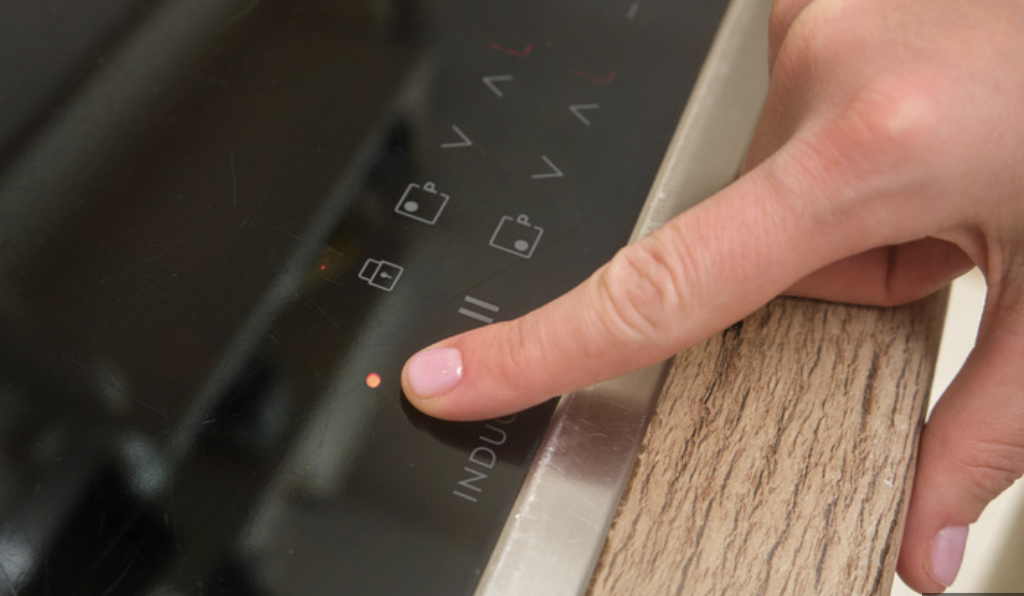
The cooktop lock symbol indicates that the control panel is disabled. When active, it prevents burners from turning on, temperatures from changing, or timers from being adjusted.
This is different from situations where a cooktop won’t power on at all. If your display is completely dead, that points to a different issue (see: Why Won’t My Cooktop Turn On?).
The lock feature is meant to:
- Prevent accidental activation
- Protect children from burns
- Allow safe cleaning of the control panel
Common Reasons the Cooktop Lock Symbol Turns On
1. The Control Lock Was Activated Accidentally
Most cooktops activate the lock when:
- A lock or key button is held for 3–5 seconds
- Multiple touch buttons are pressed at once
- The control panel is wiped while powered on
This is the most common cause and often happens during routine cleaning.
2. Child Safety Lock Is Enabled
Many electric and induction cooktops automatically enable child lock mode:
- After installation
- Following a power outage
- After a breaker reset
Induction models are especially sensitive. If your induction cooktop is also acting inconsistently, see Why Is My Induction Cooktop Not Detecting Pots?.
3. Moisture on the Control Panel
Water, steam, or cleaner residue can confuse touch controls and trigger safety features.
This is common if the cooktop was recently cleaned or used heavily. On gas cooktops, moisture can also cause ignition issues (related: Why Is My Cooktop Sparking?).
4. Power Interruption or Electrical Glitch
Brief power outages or voltage fluctuations can cause some cooktops to restart in locked mode, requiring manual unlocking before use.
How to Turn Off the Cooktop Lock Symbol
⚠️ Steps vary by brand, but these methods work for most cooktops.
Method 1: Press and Hold the Lock Button
- Locate the lock icon or Control Lock button
- Press and hold for 3–5 seconds
- Listen for a beep or watch for the symbol to disappear
Method 2: Use a Button Combination
Some models require:
- Pressing Stop/Clear + another button
- Holding two burner controls simultaneously
Check the control panel symbols closely for guidance.
Method 3: Power Reset
If the lock won’t turn off:
- Turn off the cooktop at the breaker
- Wait 1–2 minutes
- Restore power
- Try unlocking again
If the cooktop makes unusual noises after resetting, see Why Is My Cooktop Making Clicking Noises?.
What Not to Do
❌ Don’t press random buttons repeatedly
❌ Don’t force knobs or touch controls
❌ Don’t assume the cooktop is broken
Forcing inputs can make the lock harder to disengage or damage the control panel.
When the Cooktop Lock Symbol Won’t Turn Off
If the lock remains active after:
- Drying the control panel completely
- Performing a power reset
- Using the correct button sequence
You may be dealing with:
- A faulty touch control board
- A stuck button
- Internal moisture damage
At this point, professional service may be needed. According to appliance manufacturers like GE, persistent control lock issues are often related to failing control components rather than user error.
(Source: GE Appliances support documentation)
Is It Safe to Use a Cooktop With the Lock Symbol On?
Yes — the lock symbol indicates a safety feature, not a malfunction. However, the cooktop cannot be used until it is unlocked.
Quick Summary
- The cooktop lock symbol means controls are disabled
- It’s usually activated accidentally
- Holding the lock button for 3–5 seconds fixes most cases
- Moisture and power outages are common triggers
- Persistent issues may require service